
A decision can outlive the evidence that informed it.
01 / Product framing
Keep the reasoning attached to the work.
A research note, an interpretation, and a product decision answer different questions. When they become disconnected, a polished recommendation can be hard to inspect: what was actually observed, what did someone infer, and why did the team choose this direction?
The brief I set
Build a small research workspace where someone can move from an observation to an insight to a decision, then follow that chain in either direction without losing the source.
An independent product hypothesis for designers and researchers. I focused on linked records and recoverable editing; customer adoption and research-quality judgments remain outside this build.
02 / Structure before screens
Define what each record means before designing a dashboard.
I began with the information model and its failure cases. An observation preserves what was heard or seen; an insight explains what a set of observations suggests; a decision commits to a direction and records an alternative.
- FrameChoose one complete task
Follow a finding from its original note to a documented decision.
- ModelSeparate evidence from interpretation
Define record types, relationships, and the rules for changing state.
- BuildMake the connections inspectable
Implement editing, source navigation, persistence, and recovery.
- VerifyTest the failure paths
Change a source, remove a dependency, reload, and import invalid data.
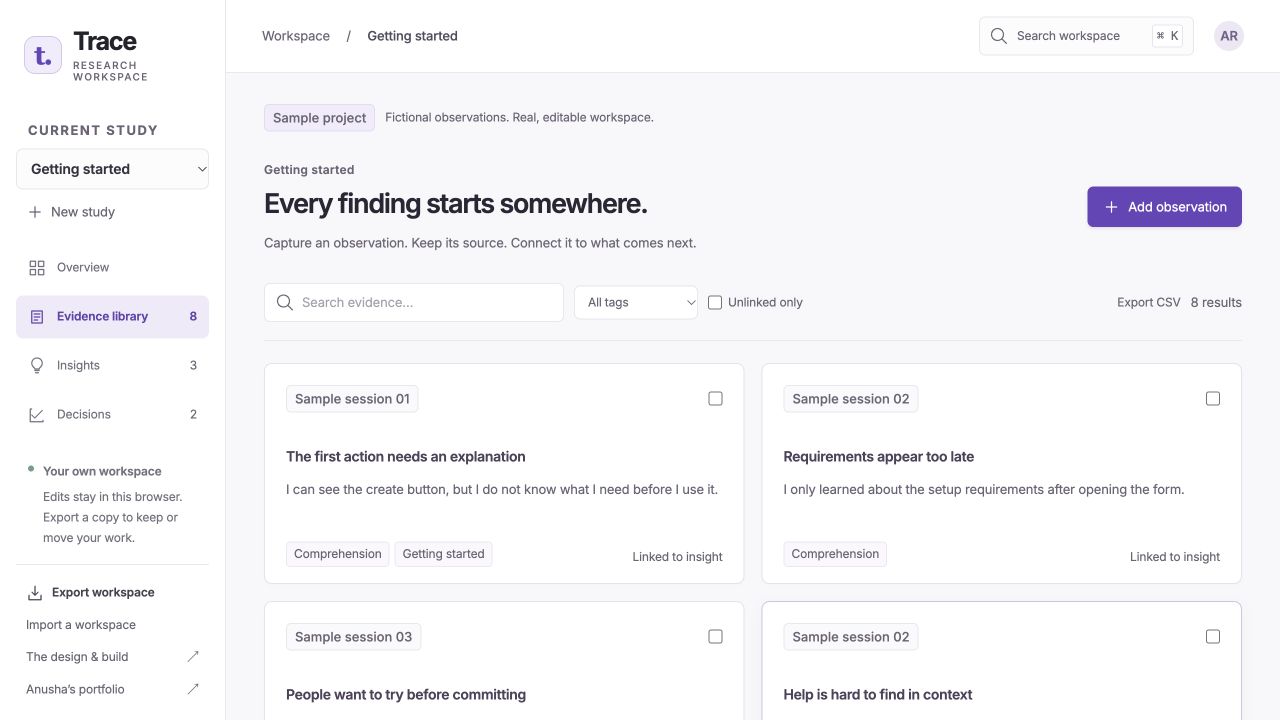
OBS-01
The first action needs an explanation
I can see the create button, but I do not know what I need before I use it.Fictional sample record from the working app.
The original note stays separate from the interpretation. It retains its source, tags, and timestamps.
Implemented ruleA source is required. Saving an observation does not automatically make it an insight.
Why separate types? One large document would be simpler to build, but would make it difficult to tell whether a sentence was an observation, interpretation, or commitment. Separate records make that distinction visible and allow the app to check the relationships.
Why references instead of copied text? Copying a quote into a finding creates a second version that can drift from its source. IDs keep the original record authoritative and let a decision detect when its supporting material has changed.
03 / Interface iteration
Give the research a considered place to live.
The initial interface gave every note the same generic card treatment. In my interface review, source labels and actions needed a clearer hierarchy. I refined the workspace around readable evidence cards, a compact comparison view, and a visual identity suited to focused research work.
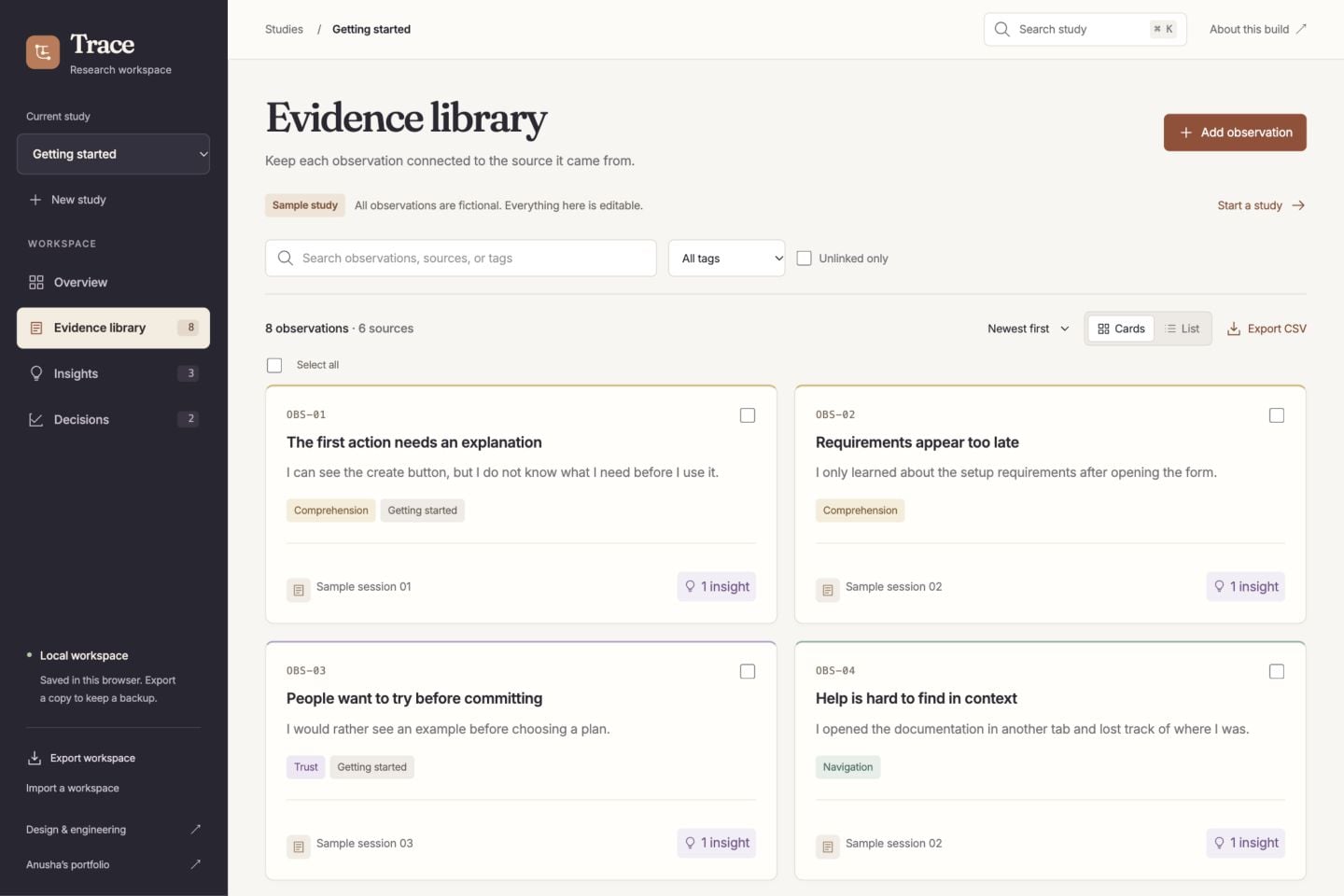
Make the current task recognizable.
Editorial headings identify the current view. The study context supports the work, while the darker navigation provides a clear orientation point. Primary actions share one consistent treatment.
Choose the right reading mode.
Cards give each observation a readable hierarchy and keep its source close. The list aligns sources, connections, and dates for comparison. Switching views preserves selection and filters.
Let color carry context.
Ink navigation, warm paper surfaces, and terracotta actions establish the product identity. Topic colors repeat on labels and card edges. Green and amber distinguish reviewed states and decisions needing attention.
The next validation is a synthesis task with designers using their own notes, checking navigation, source inspection, and the clarity of review states.
04 / The complete workflow
Make synthesis deliberate, without making it cumbersome.
A person can capture an observation with its source and tags, filter the library, and select several notes to create an insight. Those sources arrive preselected in the editor, so the connection is carried forward rather than recreated.
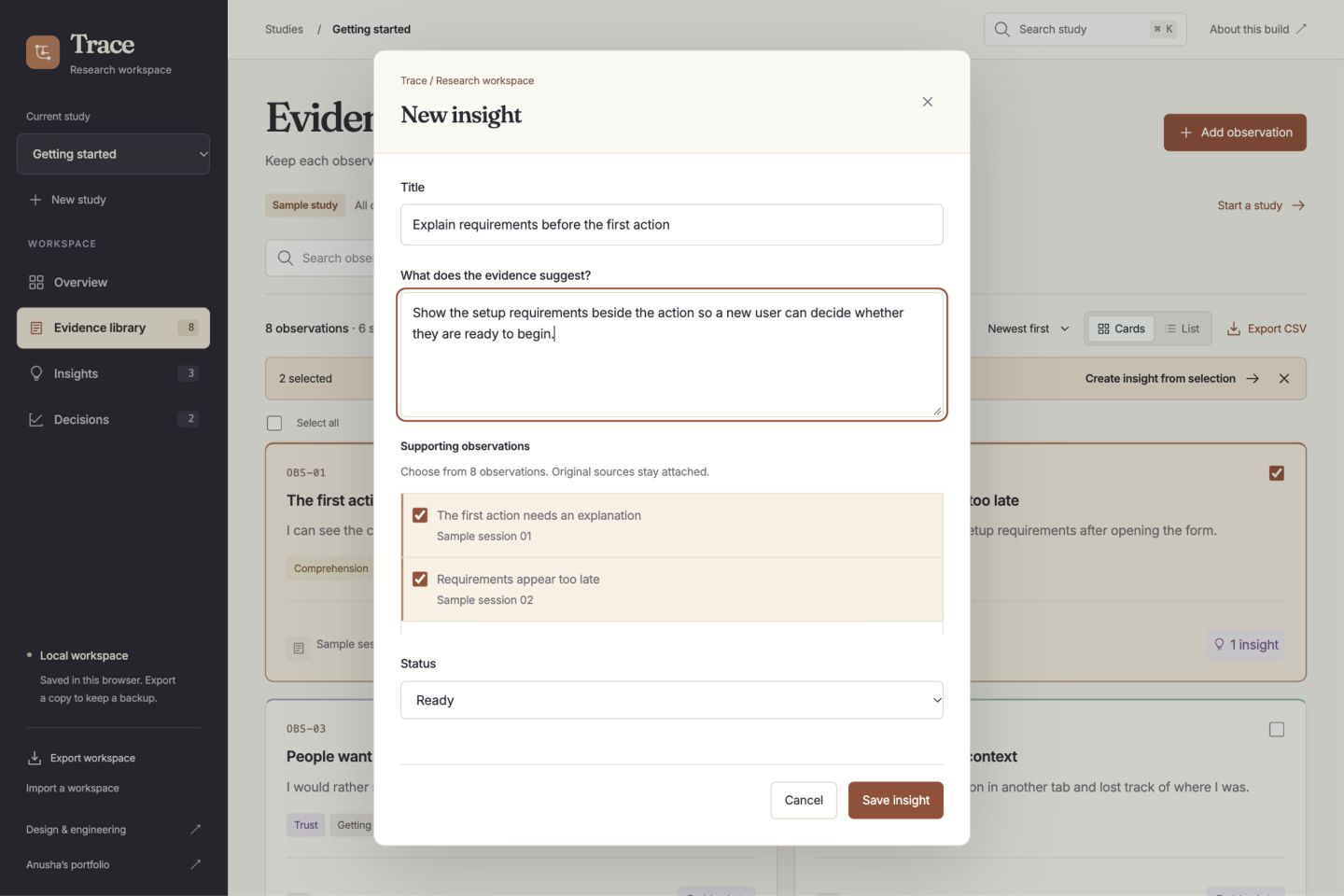
A draft can be incomplete.
Early synthesis should not require a polished conclusion. A draft can be saved without sources, but marking an insight ready requires supporting evidence. A decision remains proposed until its linked insights are ready.
Ready is a review state, not a truth score.
The app checks that evidence is attached. It does not decide whether the interpretation is sound, whether the study is representative, or whether a choice is correct. Those judgments remain with the person reviewing the work.
The interaction tradeoff
Automatic acceptance would reduce a click but hide a meaningful commitment. I kept acceptance explicit and put the original observations beside the decision so reviewing them is part of the flow.
05 / A decision can become stale
Changing a source should reopen the question.
A decision stores when its evidence was last reviewed. If a linked observation, insight, or the decision itself changes afterward, the interface flags it for review. The record stays accepted, but the app makes the changed foundation visible.
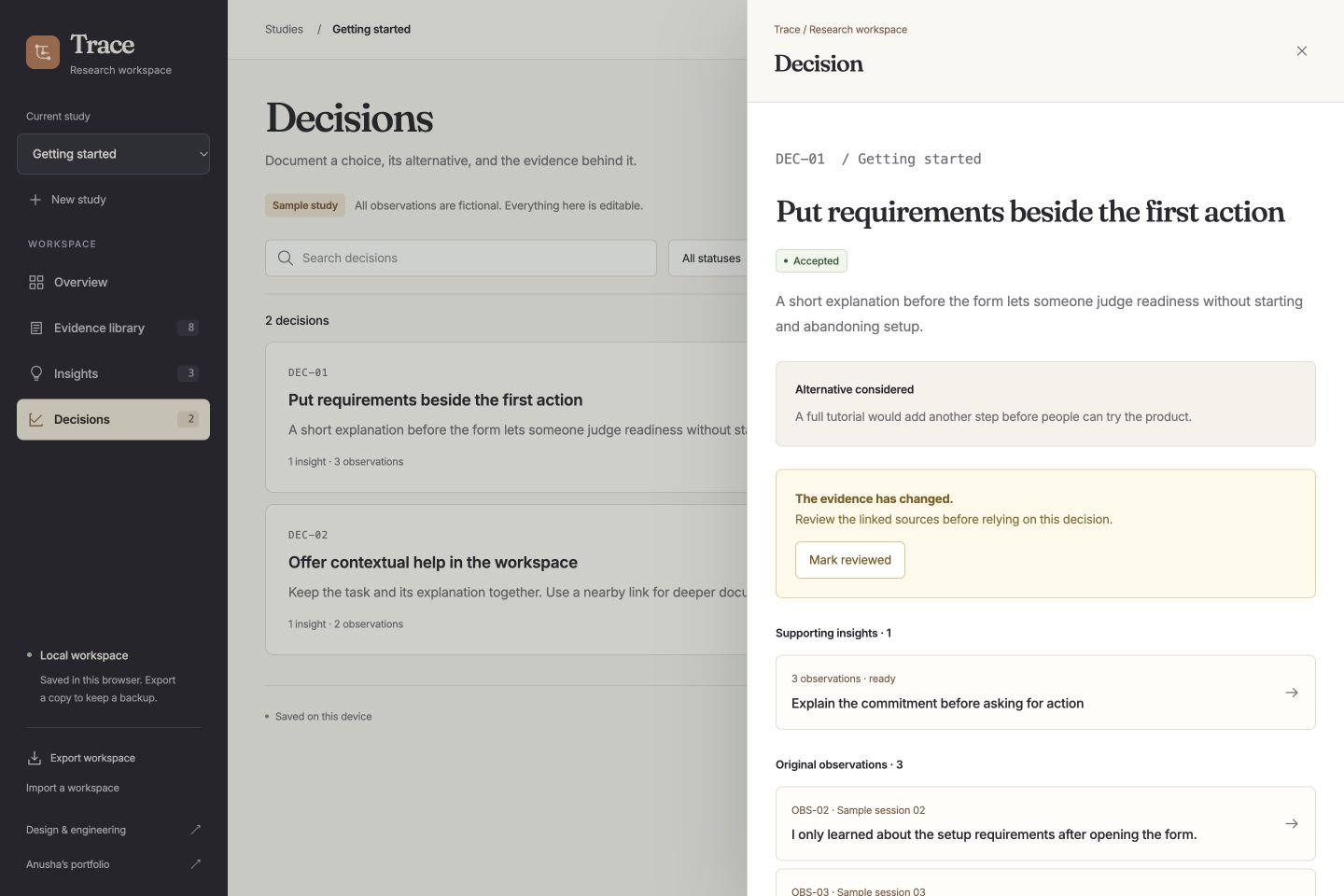
Preserve context while inspecting.
The side panel keeps the library visible behind the record. Source links lead from a decision to an insight to its original observation. Each record keeps a consistent reference code and update date.
Make removal a graph change.
Deleting evidence updates dependent links. If an insight loses its final observation, it returns to draft. A decision without supporting evidence returns to proposed. Undo restores the previous workspace, including its relationships.
Why a flag rather than a confidence score? A changed timestamp is something the system can detect reliably. A numerical confidence score would imply an assessment of research quality that this application does not perform.
06 / Engineering decisions
Keep data integrity outside the React view.
The domain layer owns validation, acceptance rules, dependency cleanup, and review flags. React handles interaction and presentation. IndexedDB persists a validated workspace through a separate storage module.
InterfaceViews, forms, native dialogs
Selection, search, filters, and keyboard interactions.
DomainTyped records and explicit rules
References, allowed statuses, acceptance, and review checks.
StorageValidated workspace snapshots
IndexedDB transactions and portable JSON exports.
Local storage as an intentional boundary
A visitor can try real editing immediately without creating an account. IndexedDB saves structured records in the current browser. The tradeoff is device-local data and no simultaneous team editing; exports provide a portable backup.
Validate imports before replacement
An imported file is treated as unknown data. The app checks the schema version, record limits, dates, IDs, allowed statuses, and relationships within each study. Only a valid file can reach the replacement confirmation.
Keep a failed save visible
The UI distinguishes saving, saved, and failed states. If storage fails, the current work stays on screen with retry and export actions. A failed initial read offers a temporary session rather than overwriting the saved workspace.
Use native behavior where it helps
Native dialogs provide keyboard focus handling and Escape behavior. Labeled controls, visible focus states, a study-scoped search shortcut, and responsive navigation support the same data model across devices.
Responsive design
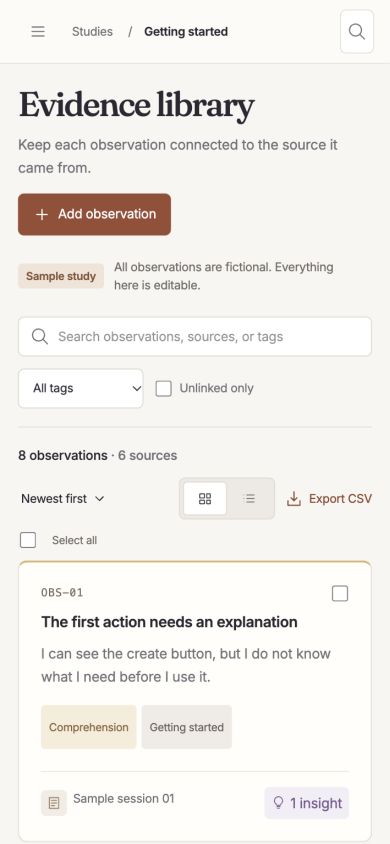
Reflow the task, not just the sidebar.
On small screens, source and connection information move below the observation. Filters wrap into separate rows, navigation opens on demand, and the detail panel uses the full width.
The record structure, validation rules, and stored workspace stay the same. Mobile is another way to perform the task, not a separate static mockup.
07 / Verification & next steps
Check the whole task, including the ways it can fail.
I verified the implemented workflow through automated checks and browser use. The important question was whether relationships and recovery stayed correct after editing, deleting, importing, and reloading—not only whether the initial screen looked complete.
| Scenario | Expected behavior |
|---|---|
| Accept an unsupported decision | Block acceptance and explain which supporting evidence is needed. |
| Edit a linked source | Flag the accepted decision for review while keeping its evidence trail intact. |
| Delete and undo | Update dependent records, then restore the prior graph through undo. |
| Reload after editing | Recover the saved workspace from IndexedDB. |
| Import invalid or cross-study references | Reject the file before replacing saved work. |
| Filter, sort, and switch views | Change the presentation while preserving the selected records and underlying data. |
Working result
A deployed research workspace with editable records, inspectable source relationships, review tracking, persistence, and recovery. The public demo and source are available at the top of this case study.
Next product validation
Observe designers completing a synthesis task with their own notes. Check whether they understand the three record types, can trace a decision to its sources, and notice when a decision needs review. That study would determine whether the structure helps in real work.
Next engineering boundary
A shared service would need authentication, authorization, server-side validation, a database, and a strategy for conflicting edits. I would establish that collaboration model before presenting this local application as a team product.